
- Acapella over another track: keep one song’s vocals and play them over a different beat, with permission where it matters.
- Instrumental intros: mute the vocals at the start of a track to blend in more smoothly.
A stem is a group of related parts mixed down to one audio file, such as all the drums or all the vocals. Here’s how stems differ from tracks, multitracks and AI-separated audio.
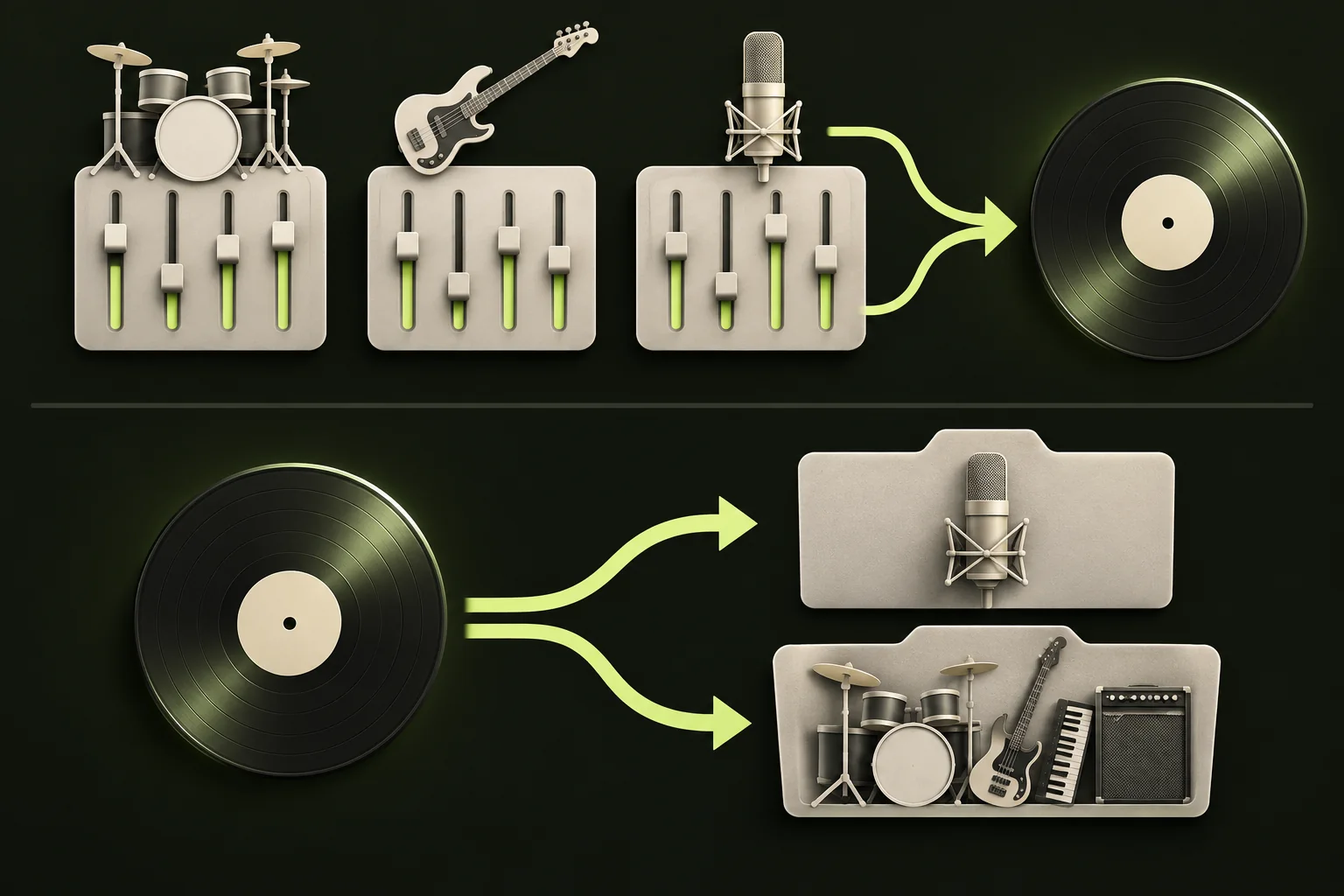
Original track groups and a finished song need different workflows.

In music production, a stem is a mixed-down group of related parts saved as a single audio file. A drum stem might hold the kick, snare, hi-hats and cymbals together, and a vocal stem might hold the lead vocal and the backing vocals.
A song is often delivered as a handful of stems, such as drums, bass, music and vocals. Played together from the same starting point, they add up to something close to the finished mix. Depending on final mix processing, such as mastering, the summed stems can differ from the released version.
Stems give someone control over the main parts of a song without handing over the whole recording session.

These words get mixed up, and the mix-up can waste time when you ask someone for files. Here’s how they usually differ.
Not everyone uses these terms the same way. Some people say stems when they mean multitracks, and DJ software uses the word for parts it separates during playback. Don’t assume tracks and stems mean the same thing to everyone.
Describe what you need instead of relying on one word. “Every individual track from the session” and “drums, bass, music and vocals as four files” are very different requests. Ask for files that all start at the same point, in a format you can use, such as WAV, and say whether you want effects like reverb included.
Studio stems are exported from the original project, so each one holds exactly the parts that were recorded or produced for it. Nothing has to be guessed.
AI separation works the other way round. It starts from the finished mix and estimates which sounds belong to which part. The results can be useful, but they aren’t the original recordings: traces of other parts can bleed through, and you may hear reverb tails or a metallic edge. AI separation can’t recover the studio files.
StemNook’s AI separation makes two tracks from a finished song: Vocals and a combined Instrumental. It doesn’t produce separate drum, bass, guitar or piano tracks.

An AI split is often enough for practice, karaoke at home or sketching an idea with a song you have permission to use. For a released remix, a professional mix or licensed use in video, ask the rights holder for the original stems or multitracks instead.

The figure has two halves. The top half shows a production example: drum, bass and vocal groups are mixed into one song. The bottom half shows what StemNook does with a finished song: it estimates two tracks, Vocals and Instrumental.
The drums and bass in the top half are there to explain how songs are built. They aren’t outputs of this site’s tools.
If you’ve split a song into vocals and an instrumental with an AI tool, compare the results with the full mix. For a clip shorter than 20 seconds, listen from beginning to end.
In DJ software, stems usually means parts of a track that the software separates while it plays, so a DJ can mute or isolate them live. Serato describes its Stems feature as real-time separation of vocals, bass, melody and drums. rekordbox offers a three-stem setup with vocal, instrumental and drums, or a four-stem setup that separates bass as well.
The Stem file format from Native Instruments takes a different approach: one file with a .stem.mp4 extension holds four stems plus the original stereo master. Feature names and options vary by app and version, so check your software’s documentation. StemNook exports separate WAV files, not .stem.mp4 files, and does not provide live DJ stem controls.

A two-track split like StemNook’s covers the vocal moves. Drum-only or bass-only moves need more stems than it makes.

Start with what you can get and what you need.
Before you start, check that you have the rights for what you plan to do with the result, especially if you’ll publish it.
A track is usually one part, like a single vocal take or one guitar. A stem is usually a group of tracks combined into one file, like all the guitars. Usage varies, so describe what you mean when you ask for files.
Mostly for remixing, mixing, live performance, editing songs for video and practice. They let someone work with the main parts of a song without the full session.
No. AI separation estimates parts from the finished mix, so it can leave traces of other sounds and can’t recover the original recordings. Studio stems come from the original project.
Its AI separation is built to split a song into Vocals and a combined Instrumental. That covers karaoke, practice and vocal work, but not drums, bass or other instruments on their own.
Not from StemNook. If you need them, ask the rights holder for the original stems, or use a tool that separates more parts and check its limits.
Be specific. Ask for “every individual track from the session, all starting at the same point, as WAV files,” and say whether you want effects included. If you only need grouped stems, list the groups you want.
These sources explain production and DJ terminology. They do not imply that StemNook offers the same features.